At WiseTech, we are witnessing a dangerous surge in a specific type of cybercrime hitting our community: Social Engineering via Account Takeover (ATO). This isn't just about losing access to your Telegram or WhatsApp; it is a coordinated effort to steal life-changing sums of money—often 50,000 ETB or more—from your contacts, closest friends and family.
As a cybersecurity professional with over 15 years of experience managing national-scale infrastructure, we can tell you that the weakest link is rarely the app's encryption—it is the trust we have in our contacts.
The Anatomy of the Attack: New & Sophisticated Scenarios
In 2026, scammers have moved beyond simple "hello" messages. They now use elaborate setups to trick even tech-savvy users into handing over their access codes.
1. The "Zoom / Google Meet" Invitation Scam
This is currently one of the most common tactics targeting professionals and students in Ethiopia.
- The Trap: You get a message saying, "We are starting a community meeting (or job interview) on Zoom. I am adding you now, but I need to verify you aren't a bot. I sent a verification code to your Telegram; please send it to me so the system lets you into the call."
- The Reality: There is no Zoom call. The "verification code" is actually the login OTP for your account. By giving it to them, you are handing over the keys to your digital life.
2. The "Help Me Login" Trick
You receive a message from a contact you know. They say: "I’m trying to log into my account on a new phone, but it’s sending the code to you by mistake. Can you send it back to me?"
- The Reality: That friend’s account has already been hacked. The code you just received is the SMS verification code for YOUR account.
3. The "Telebirr/M-PESA Reward" QR Code
- The Trap: A "friend" sends you a QR code, saying, "Scan this to receive your 1,000 ETB bonus from Telebirr."
- The Reality: When you scan the code, it may actually be a "Link Device" request. Instead of receiving money, you are accidentally authorizing the scammer’s laptop to mirror your entire WhatsApp account.
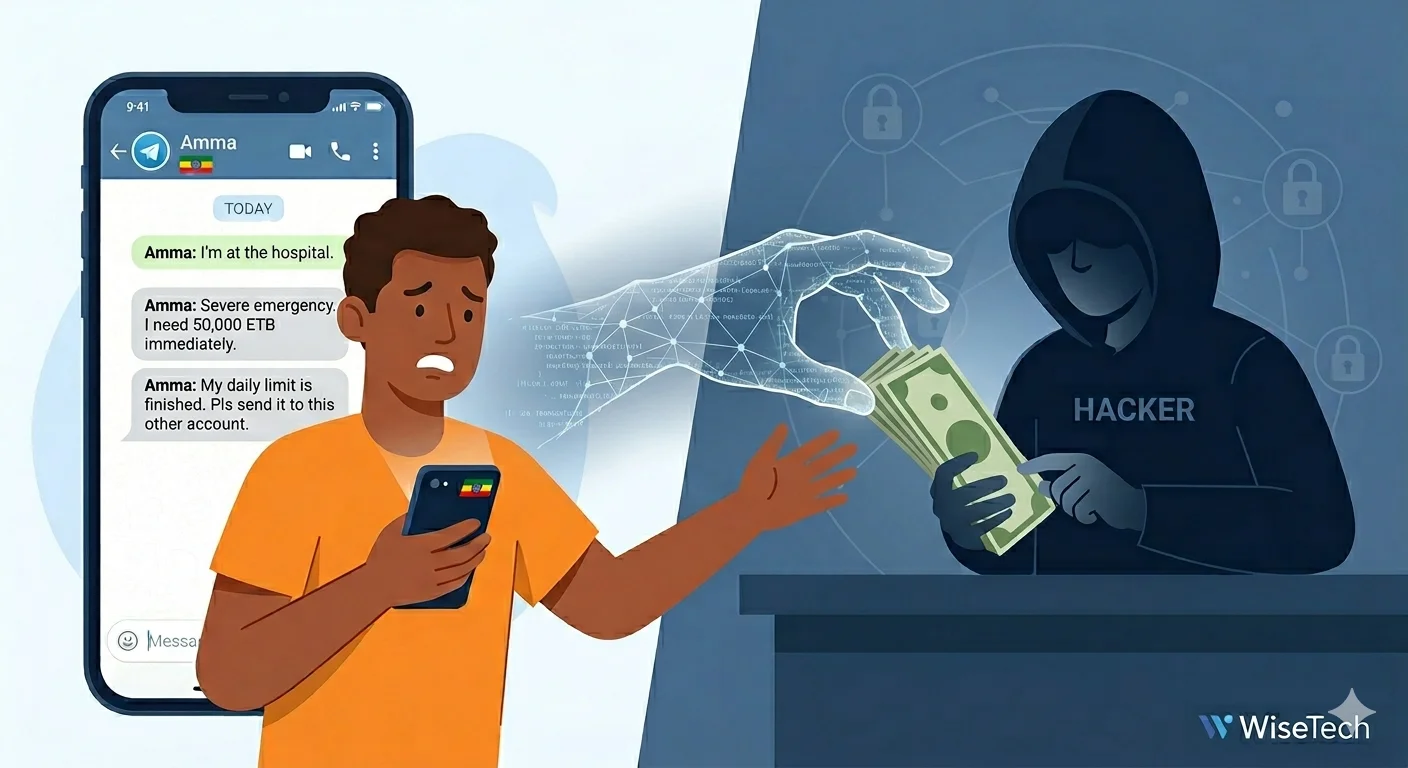
The "Hospital Bill" Script: Why 50,000 ETB?
Once the scammer has control, they act fast. They find your parents, siblings, or best friends in your chat history and send a sequence of messages designed to trigger panic:
"I am at the hospital right now, it’s an emergency. I need to pay for surgery immediately and I’m short by 50,000 ETB. Can you please help me? I'll pay you back tomorrow."
When the victim tries to send money, the scammer provides a different bank account name and number (CBE, Awash, Abyssinia, etc.).
The "Daily Limit" Deception: If the victim asks why they aren't using their own account, the scammer has a ready-made excuse: "My bank account has already reached its daily transfer limit (Daily Limit), so please send it to this colleague/nurse's account instead." By using these "mule accounts," they make it nearly impossible for a single bank to stop the transaction once it is authorized.
Advanced Protection: The WiseTech "Defense-in-Depth" Strategy
To truly secure your digital presence, you must adopt a professional-grade security mindset.
1. Mandatory Two-Step Verification (2FA)
This is your Master Lock. Even if a hacker steals your SMS code, they cannot enter your account without a secondary PIN that only you know.
- Action: Go to Settings > Privacy > Two-Step Verification. Choose a unique PIN.
2. Audit Your "Active Sessions" Weekly
Think of this as checking the locks on your doors. You can see exactly which devices (and from which cities) are logged into your account.
- Action: In your app, go to Devices. If you see a login from a device or location you don't recognize, click "Terminate all other sessions" immediately.
3. Set a SIM PIN
In Ethiopia, if someone steals your physical phone, they can put your SIM into another device to receive your login codes.
- Action: Go to your phone's Cellular/Security settings and set a SIM PIN. This prevents the SIM from working in any device without the code.
4. The "Voice Verification" Rule
Trust Nothing Without a Voice: If a friend asks for money on a messaging app, call them. If they don't pick up or the voice sounds wrong, it is a scam.
A Final Word from WiseTech
Cybersecurity is a shared responsibility. When you secure your account, you aren't just protecting yourself—you are protecting everyone in your contact list from being defrauded of their hard-earned savings.